Main Page: Difference between revisions
Jump to navigation
Jump to search
Fix kin-news markup after Wishing Well tile |
Add Supported Wallets to Explore Kintara section |
||
| Line 33: | Line 33: | ||
<div class="kin-card">[[File:lvl_30.png|82px|link=Category:Quests|Daily Quests]]<div class="kc-label">[[:Category:Quests|Daily Quests]]<span class="kc-sub">Reset 00:00 UTC</span></div></div> | <div class="kin-card">[[File:lvl_30.png|82px|link=Category:Quests|Daily Quests]]<div class="kc-label">[[:Category:Quests|Daily Quests]]<span class="kc-sub">Reset 00:00 UTC</span></div></div> | ||
<div class="kin-card">[[File:gold.png|82px|link=Economy|Economy]]<div class="kc-label">[[Economy|Economy]]<span class="kc-sub">Gold & $KINS</span></div></div> | <div class="kin-card">[[File:gold.png|82px|link=Economy|Economy]]<div class="kc-label">[[Economy|Economy]]<span class="kc-sub">Gold & $KINS</span></div></div> | ||
<div class="kin-card">[[File:wallet_icon.png|82px|link=Supported Wallets|Supported Wallets]]<div class="kc-label">[[Supported Wallets|Supported Wallets]]<span class="kc-sub">Phantom, Solflare & more</span></div></div> | |||
<div class="kin-card">[[File:Cosmetic red aura.png|82px|link=Category:Cosmetics]]<div class="kc-label">[[:Category:Cosmetics|Cosmetics]]<span class="kc-sub">Skins & styles</span></div></div> | <div class="kin-card">[[File:Cosmetic red aura.png|82px|link=Category:Cosmetics]]<div class="kc-label">[[:Category:Cosmetics|Cosmetics]]<span class="kc-sub">Skins & styles</span></div></div> | ||
<div class="kin-card">[[File:Furniture throne.png|82px|link=Events|Events]]<div class="kc-label">[[Events|Events]]<span class="kc-sub">Surprise activities</span></div></div> | <div class="kin-card">[[File:Furniture throne.png|82px|link=Events|Events]]<div class="kc-label">[[Events|Events]]<span class="kc-sub">Surprise activities</span></div></div> | ||
Revision as of 19:44, 2 July 2026
Welcome to the Kintara Wiki!
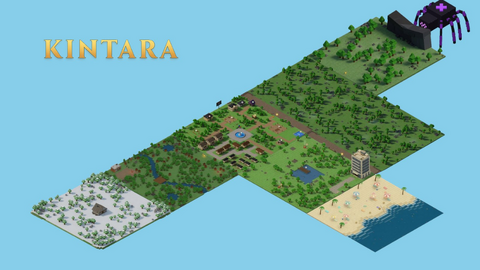
The community-built encyclopedia for Kintara, covering game updates, locations, mobs, skills, items, economy routes, and progression guides for players.
Number of articles: 401
Number of files: 426
Number of edits: 3,557
Active users: 4
Game Updates
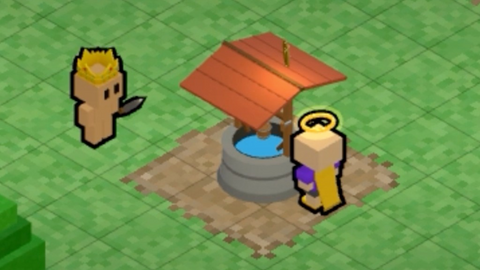
Donate to St. Jude through the in-game Wishing Well — SOL via donate.gg, raffle entries for Golden Halo, Crown, and Slippers, plus a Donor badge.
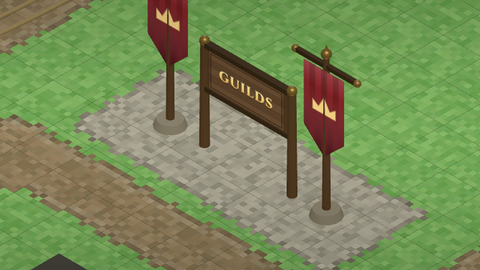
Form clans, set custom tags, earn +5% XP, and fund Guild Life with shared resource upkeep — up to 20 members per guild.
Personal Gold for daily quest completers and a 3,000 Gold Global pool — donate materials, earn claim limits, and trade bundles for Gold.
Explore Kintara

LocationsRealms & areas

Skills6 to master

MobsWild & tameable

ResourcesGather & craft

ItemsTools & gear

MountsSpeed & flexing

PetsCompanions

NPCsShops & guides

Daily QuestsReset 00:00 UTC

EconomyGold & $KINS

Supported WalletsPhantom, Solflare & more

CosmeticsSkins & styles

EventsSurprise activities

GuildsPlayer clans & teams
New player guideKintara starts in Mainland, then quickly opens into gathering, combat, trading, and level-gated zones. These are the first pages most players should read. 1. Get armedTalk to the Quartermaster for your starter Sword.
2. Gather basicsUse Woodcutting and Mining in the Wilderness.
3. Bank oftenStore materials at the Bank before risky trips.
4. Trade upBring bulk materials to the Traveling Merchant for Gold.
Popular pagesSkill trainingCurrencies
|
The Kintara DiscordJoin the community server› Official Discord @PlayKintaraFollow for updates› Official X @kintarawikiWiki updates› Wiki X Wiki build statusThe Kintara Wiki now has styled pages, infoboxes, category hubs, reusable templates, and protected editing. Public visitors can browse safely while trusted editors maintain the content. |


